> ## Documentation Index
> Fetch the complete documentation index at: https://docs.sudo.africa/llms.txt
> Use this file to discover all available pages before exploring further.
# Create API Key
Creating an API Key can be easily done on your dashboard by following these steps.
# How to Create API Key
1. Log in to the Sudo Dashboard and click on **Developers**.
2. Click on **API Keys** in the **Developers** navigation menu seen horizontally on your screen. Click on the **Create API Key** button, located on the right-hand side of your screen.
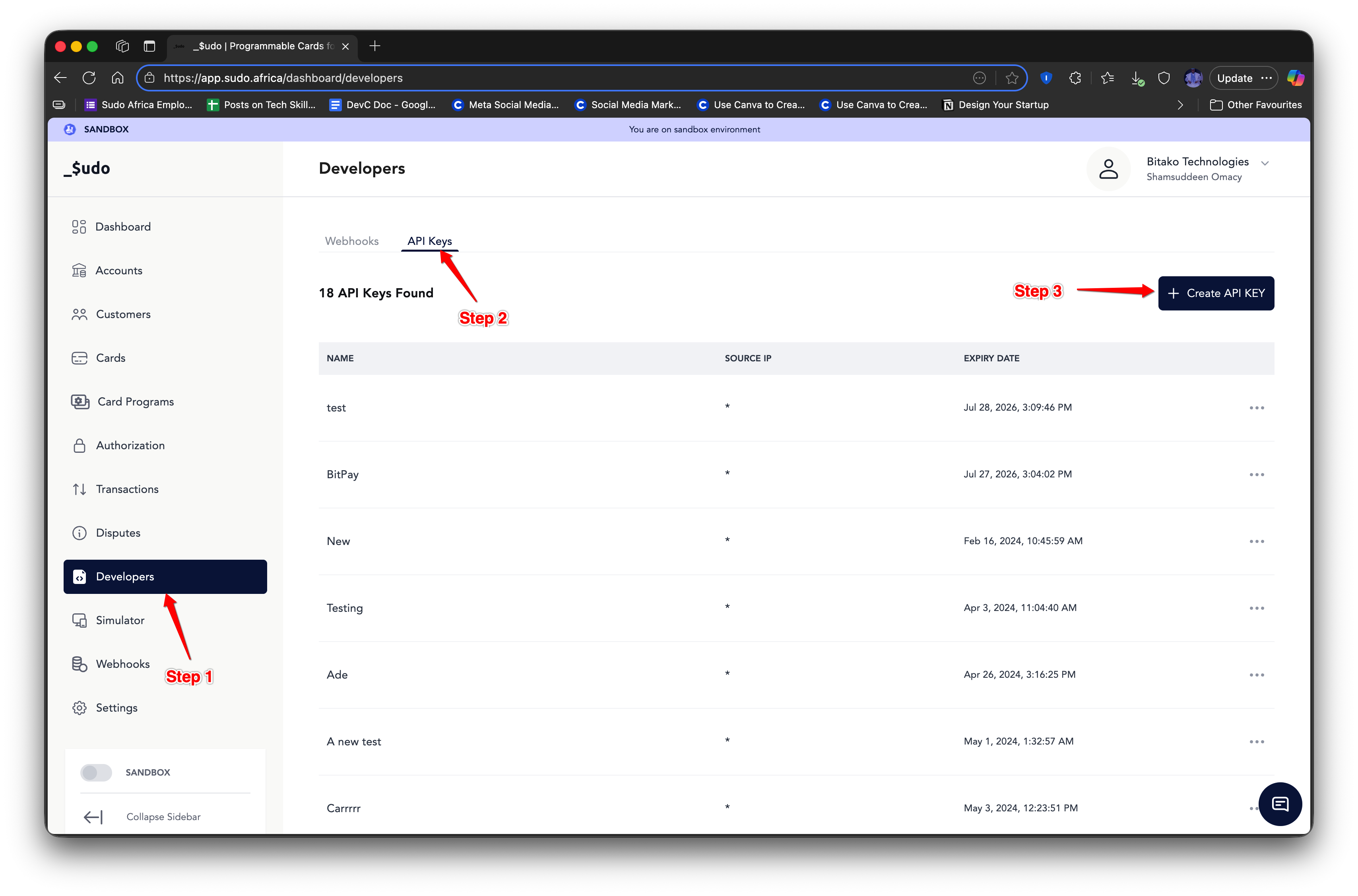 3. Then fill in the required details for your key, such as **Name**, **Validity Period**, and **IP Address** (Optional) as indicated in Steps 4, 5, and 6 respectively.
4. Once you're done, click on the **Create API Key** button on the modal, as shown in Step 7.
5. Copy the API Key shown on your screen as it will be shown only once and can not be retrieved afterward.
3. Then fill in the required details for your key, such as **Name**, **Validity Period**, and **IP Address** (Optional) as indicated in Steps 4, 5, and 6 respectively.
4. Once you're done, click on the **Create API Key** button on the modal, as shown in Step 7.
5. Copy the API Key shown on your screen as it will be shown only once and can not be retrieved afterward.
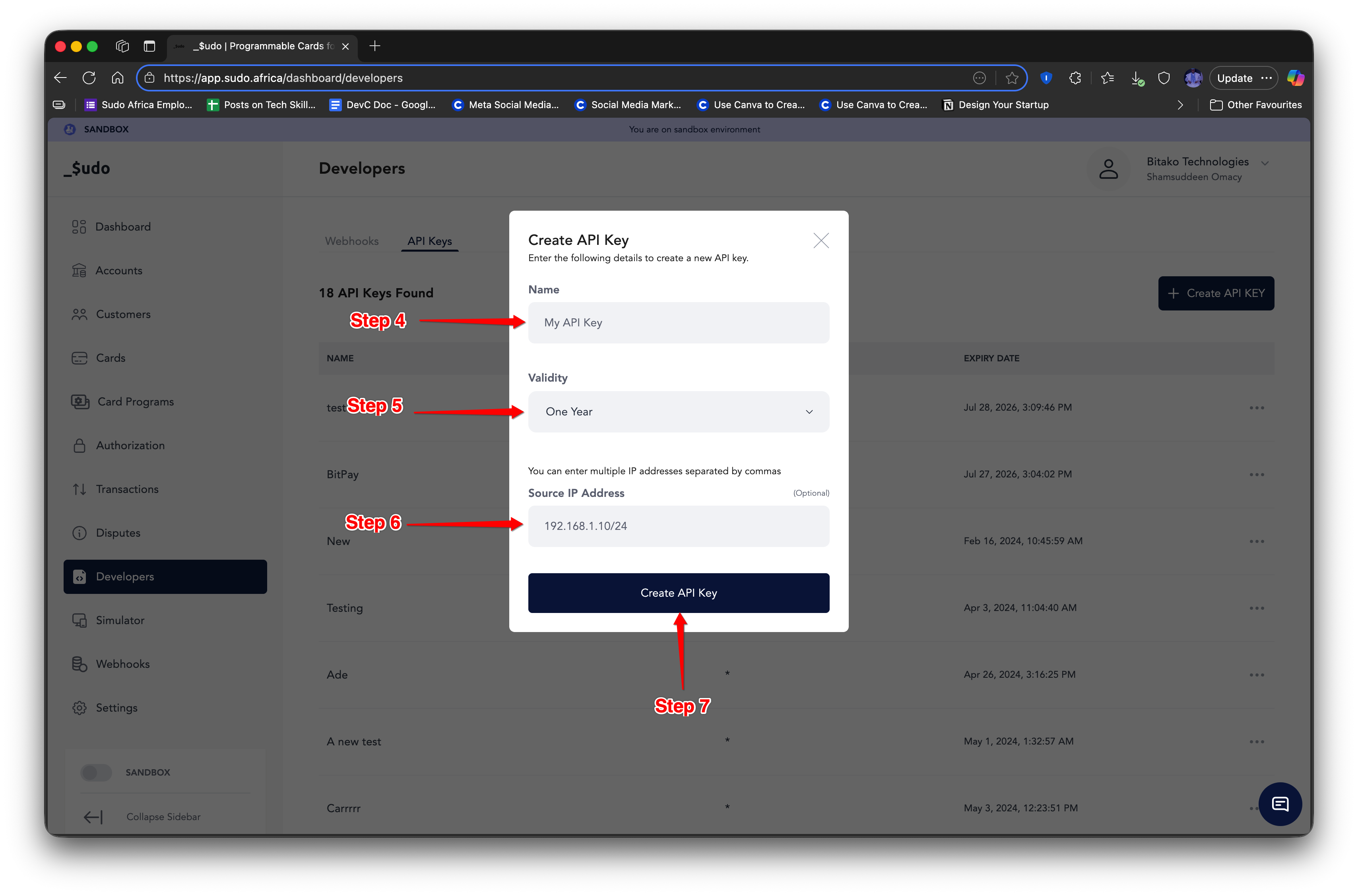 If an IP address is provided, only requests originating from that IP will be allowed. If no IP is provided, all requests will be denied.
## IP Whitelist
The IP Whitelist system is a security layer used to restrict access to protected API Keys by allowing requests only from explicitly approved IP addresses or IP ranges.
### Supported IP Formats
Sudo supports the following IP formats for flexibility and security:
| Format Type | Description | Example |
| ---------------- | -------------------------------------------- | -------------------------------------- |
| Exact IPv4 | Matches a single IPv4 address | 192.168.1.10 |
| Exact IPv6 | Matches a single IPv6 address | 2c0f:eb58:612:3500:e839:c029:487f:12a7 |
| IPv6-mapped IPv4 | Automatically normalized | ::ffff:192.168.1.10 → 192.168.1.10 |
| CIDR Notation | Matches a subnet range | 192.168.0.0/16 or 2607:f8b0::/32 |
| Regex Pattern | Dynamic IP matching with regular expressions | \`/^10.0.(1 |
| Wildcard | Automatically allows all IPs | \*, 0.0.0.0, "", \[\*] |
Think your API Key is compromised or stolen, you can delete an API Key by clicking on the delete button beside each key as shown on the table.
If an IP address is provided, only requests originating from that IP will be allowed. If no IP is provided, all requests will be denied.
## IP Whitelist
The IP Whitelist system is a security layer used to restrict access to protected API Keys by allowing requests only from explicitly approved IP addresses or IP ranges.
### Supported IP Formats
Sudo supports the following IP formats for flexibility and security:
| Format Type | Description | Example |
| ---------------- | -------------------------------------------- | -------------------------------------- |
| Exact IPv4 | Matches a single IPv4 address | 192.168.1.10 |
| Exact IPv6 | Matches a single IPv6 address | 2c0f:eb58:612:3500:e839:c029:487f:12a7 |
| IPv6-mapped IPv4 | Automatically normalized | ::ffff:192.168.1.10 → 192.168.1.10 |
| CIDR Notation | Matches a subnet range | 192.168.0.0/16 or 2607:f8b0::/32 |
| Regex Pattern | Dynamic IP matching with regular expressions | \`/^10.0.(1 |
| Wildcard | Automatically allows all IPs | \*, 0.0.0.0, "", \[\*] |
Think your API Key is compromised or stolen, you can delete an API Key by clicking on the delete button beside each key as shown on the table.